
Teltonika RUTX50
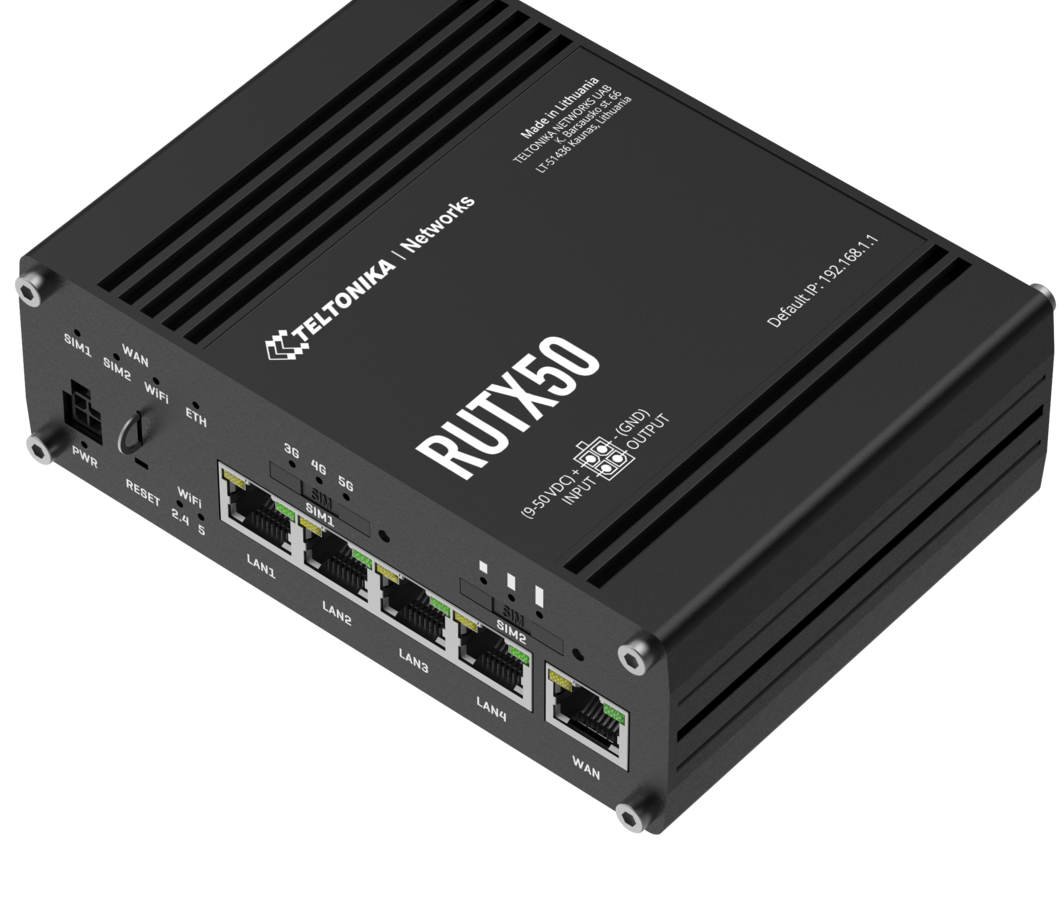
The Teltonika RUTX50 is a 5G industrial router at the top of the RUT series. It combines sub-6 GHz 5G connectivity, dual-band Wi-Fi 5, and the full depth of Teltonika’s RutOS firmware in a compact aluminium enclosure built for deployments that run unattended for years. The eSIM variant – the RUTX50E – adds an eUICC chip supporting SGP.22 remote SIM provisioning alongside the physical SIM slot, making it one of the more capable eSIM-enabled industrial routers available in the UK market.
This guide covers what the RUTX50 is, who deploys it and why, how the eSIM capability works in practice, and ten features that make it genuinely useful beyond basic connectivity.
Hardware specification
| Teltonika RUTX50 – Key Specifications | |
|---|---|
| Cellular modem | Quectel RM502Q-AE · 5G NR Sub-6 GHz SA/NSA (4×4 MIMO) · 4G LTE Cat 20 · 3G fallback |
| Peak downlink / uplink | 5G: 3.3 Gbps DL / 900 Mbps UL · 4G: 2.0 Gbps DL / 200 Mbps UL |
| SIM slots | 2 x Mini SIM (2FF) on standard RUTX50 · RUTX50E adds eUICC (SGP.22) alongside one physical slot |
| Ethernet | 5 x RJ45 Gigabit (1 WAN + 4 LAN · WAN reconfigurable as LAN) · IEEE 802.3/802.3u/802.3az |
| Wi-Fi | 802.11b/g/n/ac Wave 2 (Wi-Fi 5) · dual-band 2.4 GHz + 5 GHz · up to 867 Mbps · MU-MIMO · WPA3 |
| USB | 1 x USB Type-A · external storage, tethering, USB-to-serial adapters |
| Digital I/O | 1 x digital input + 1 x digital output on the 4-pin DC power connector |
| GNSS | Built-in GPS, GLONASS, BeiDou, Galileo · dedicated SMA connector on rear panel |
| Power input | 9-30 V DC via 4-pin connector · passive PoE via LAN1 (non-standard, not IEEE 802.3af/at) |
| Power consumption | Idle <4 W · maximum <18 W |
| Operating temperature | -40 to +75 degrees Celsius |
| Enclosure | Aluminium · DIN-rail or desktop mount |
| CPU / RAM / Flash | Quad-core ARM Cortex-A7 @ 717 MHz · 256 MB RAM · 256 MB Flash |
| Firmware | RutOS (OpenWrt-based Linux) |
Physical layout
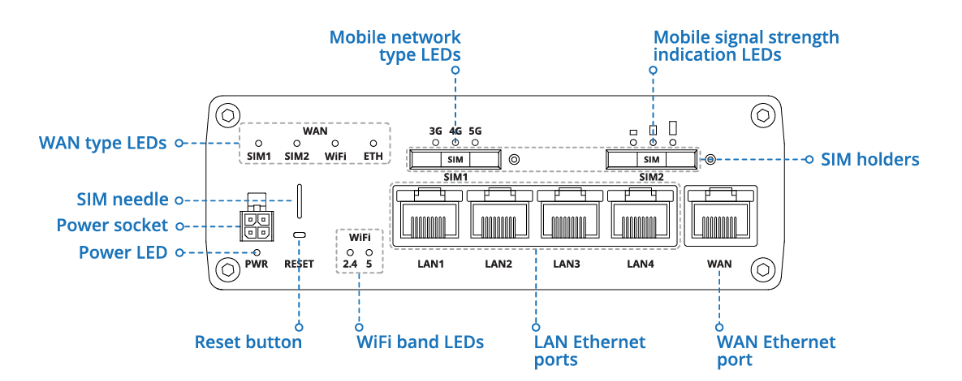 RUTX50 physical features overview. Ethernet ports, SIM slots, status LEDs, USB, reset button, and power/IO connector are all on the front panel. All antenna connectors are on the rear.
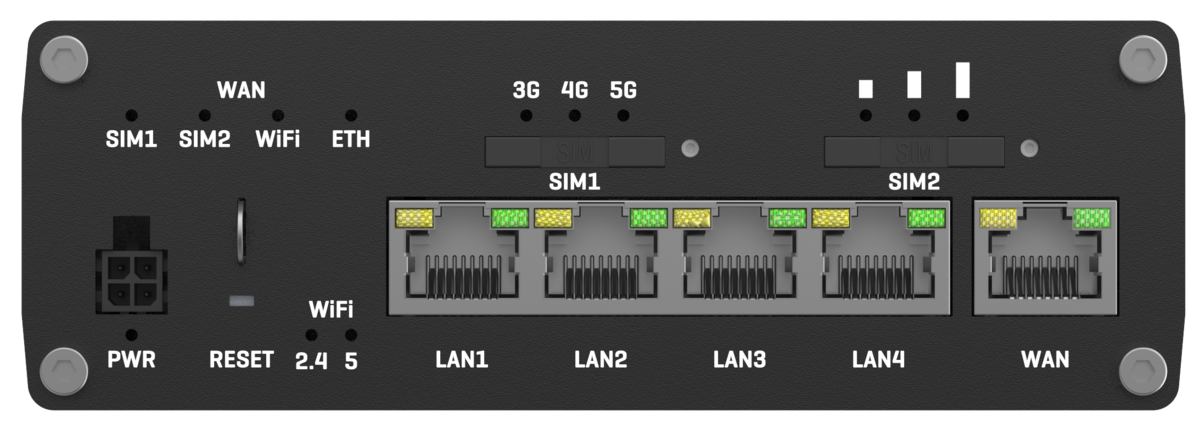 Front panel: 5x Gigabit Ethernet (WAN + 4 LAN), dual Mini SIM (2FF) slots, status LEDs, 4-pin power and IO connector, reset button.
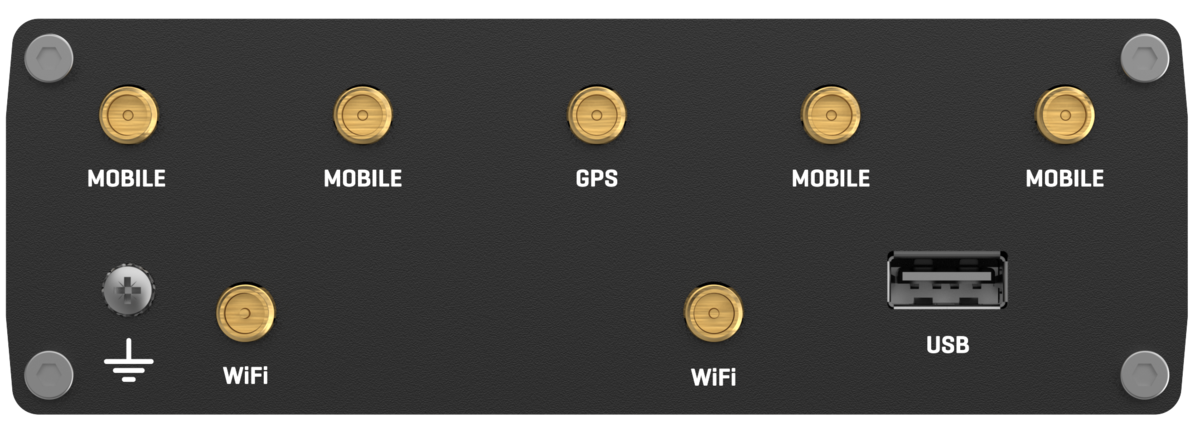 Rear panel: 4x SMA mobile (MIMO), 2x RP-SMA Wi-Fi, 1x SMA GNSS, USB Type-A, grounding screw.
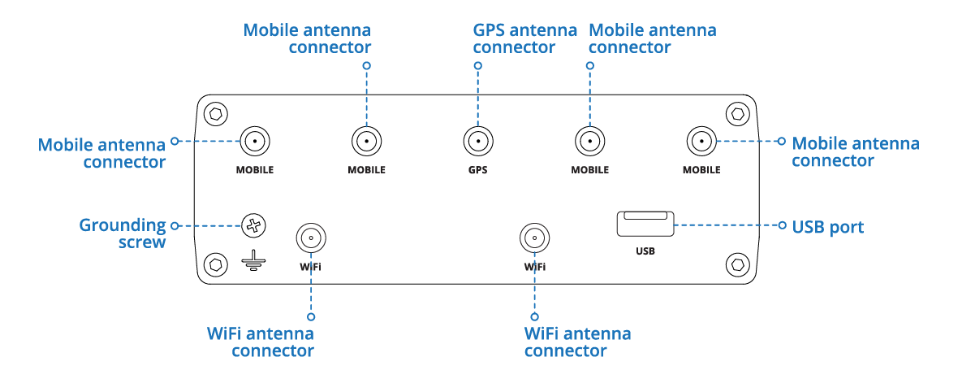 Antenna and USB connector detail. SMA (mobile) and RP-SMA (Wi-Fi) connectors look nearly identical but are not interchangeable – forcing the wrong antenna onto the wrong port will damage the thread.
Antenna connectors
| Connector | Type | Purpose | What you need |
|---|---|---|---|
| MOB1 – MOB4 | SMA female | 5G/4G cellular (4×4 MIMO) | 4x external cellular · minimum a 4-in-1 MIMO antenna |
| WiFi1 – WiFi2 | RP-SMA female | Dual-band Wi-Fi 2.4/5 GHz | 2x omni or directional Wi-Fi antenna |
| GNSS | SMA female | GPS/GLONASS/BeiDou/Galileo | Active GNSS antenna (3-5V via coax) · route separately from cellular cables |
4-pin power connector and digital I/O
The digital input and output share the DC power connector rather than having separate terminals. The included pigtail cable is colour-coded: red (power positive, 9-30V DC), green (digital input), black (ground), white (digital output). Input thresholds: 0-5V is logic low, 8-30V is logic high. Output is open collector, rated to 30V / 300mA maximum.
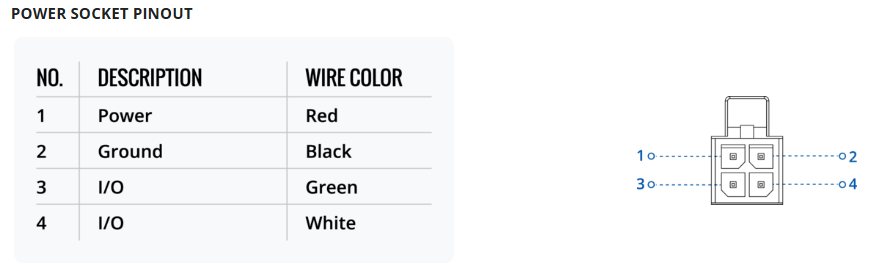 4-pin power connector pinout. Digital input and output share this connector with the DC power supply wires. Input: 0-5V logic low, 8-30V logic high. Output: open collector, max 30V / 300mA.
The RUTX50 does not have dedicated RS232 or RS485 hardware ports. Serial Utilities in RutOS provides access to the modem AT command interface and console shell – useful for diagnostics but not for connecting serial field devices. For hardware RS232 or RS485 with Modbus RTU support, the correct Teltonika hardware is the RUT956 or RUT906. A USB-to-RS485 adapter on the USB port works as a workaround but is not suited to production deployments.
What the USB port is actually for
The USB Type-A port on the rear panel serves several roles:
- External storage – USB flash drives or hard drives for local data logging, configuration backup, and SMS message storage. Useful on sites where cloud connectivity cannot be guaranteed and local records are needed.
- USB tethering – a smartphone connected via USB provides an additional WAN path. Practical for temporary deployments or as a recovery option if both SIMs are unavailable.
- USB modem or dongle – a USB cellular dongle provides a third WAN interface for MWAN3 failover on a different MNO from the built-in modem.
- USB-to-serial adapters – extends serial capability where native ports are unavailable, as noted above.
Who uses the RUTX50 and why
- Energy and utilities infrastructure – BESS sites, solar farms, substations, and grid monitoring where 5G backhaul supports high-frequency telemetry and SCADA alongside video surveillance. Dual-SIM failover keeps the primary control path live if one network degrades.
- Industrial automation – factory and warehouse environments requiring high-throughput cellular backhaul alongside integration with PLCs and control systems.
- Transport and smart infrastructure – roadside cabinets, traffic management systems, and vehicle deployments where the -40 to +75 degree operating range fits standard cabinet installations.
- Construction and temporary sites – rapid deployment of high-throughput connectivity for a defined project period, then hardware recovery for redeployment.
- Managed service providers – where a connectivity provider manages a large router estate entirely via RMS without site visits.
eSIM on the RUTX50: what the RUTX50E gives you
The RUTX50E adds an embedded eUICC chip alongside one physical Mini SIM (2FF) slot. The eUICC is SGP.22 compliant. Profile management works through a compatible operator portal or eSIM management platform: enter an activation code or QR code into RutOS or RMS and the profile downloads over the air. Pre-provision before installation, change operator remotely if on-site coverage proves inadequate, and run the physical SIM on one MNO with the eUICC on a second MNO for genuine carrier diversity without two physical SIM cards.
Teltonika’s own documentation recommends applying a thin layer of dielectric grease to SIM card contacts before installation in high-vibration environments, to maintain reliable contact and prevent unexpected connection failures. This is standard practice for routers in vehicles, construction plant, and rotating machinery – but it is a maintenance step that needs repeating every time the SIM is removed and reinserted.
An eUICC has no physical contact to degrade. There is no card to work loose, no contacts to corrode, and no maintenance procedure required. In environments where vibration is a genuine concern, eSIM removes a known failure mode entirely rather than managing it with grease.
For deployments requiring fully automated profile management via SGP.32, the RUTX50E is not the right device today. SGP.32 targets constrained IoT endpoints rather than high-throughput routers, and SGP.22 remains the appropriate standard for router-class hardware at this point.
Deciding which cellular technology to use for your eSIM deployment? IoT Portal’s reference guide compares 2G, 4G, 5G, LTE-M and NB-IoT across speed, power efficiency, latency, signal penetration and UK network availability.
Compare 2G, 4G, 5G, LTE-M and NB-IoT specifications at IoT PortalTen features worth understanding on the RUTX50
SMS control – direct to the router, not via a portal
Send an SMS to the router’s SIM phone number and it replies with connection status, signal strength, current IP address, and other diagnostic data. Configured commands can trigger actions: reboot, switch WAN interface, restore factory defaults, run a script. The router holds a whitelist of authorised numbers and ignores commands from any number not on it.
The critical operational value: SMS control works when the router’s data connection is down or degraded, because it uses the SIM’s voice and SMS service rather than the data path. For a device at a remote site where the WAN has failed overnight, SMS is often the only management channel available before a physical visit. RMS also supports SMS-triggered actions via its own interface – both coexist.
VPN suite – WireGuard, OpenVPN, IPsec and more
RutOS supports WireGuard, OpenVPN, IPsec/IKEv2, L2TP, PPTP, and SSTP with multiple tunnels running simultaneously. WireGuard is the right default for new deployments: fast, simple to configure, and minimal attack surface. OpenVPN remains common where existing enterprise infrastructure is in place. IPsec/IKEv2 is required for compatibility with Cisco, Fortinet, and similar firewall appliances common in utility and industrial control environments. VPN configuration can be pushed remotely via RMS without visiting each site.
MWAN3 multi-WAN failover
MWAN3 monitors each WAN interface independently and routes traffic based on configurable priority rules. Health checks are configurable: ping to a target IP, DNS resolution, or HTTP request. With the RUTX50E, physical SIM on one MNO and eUICC on a second MNO gives genuine carrier diversity – two paths that are unlikely to fail for the same reason simultaneously.
Important for SCADA deployments: MWAN3 does not transparently migrate established TCP sessions during a WAN switch. A persistent session such as DNP3 over TCP will drop when the active interface changes. For session continuity across failover, run control traffic through a VPN tunnel – the tunnel re-establishes on the new interface without the application layer seeing a connection drop.
Teltonika RMS remote management
RMS tunnels a full browser session to the router’s management interface through an encrypted connection without requiring a public IP or VPN endpoint at the device. For routers behind CGNAT on a shared APN – the majority of UK cellular deployments – this removes the main constraint of remote management. RMS also provides firmware updates, configuration push, SMS sending, command execution, and event alerting. RMS 4.0 added individual parameter configuration directly from the platform without needing to upload a complete configuration backup.
Digital I/O on the power connector
One digital input and one digital output, both on the 4-pin DC power connector as shown above. Input: 0-5V is logic low, 8-30V is logic high. Output: open collector, rated 30V / 300mA. The input monitors external signals – door open, UPS power fail, tamper switch, generator run state. The router responds with SMS alerts, RMS events, script execution, or WAN behaviour changes. The output switches relays or activates external equipment. Combined with SMS control, a text message can physically actuate a device on a remote site without anyone present.
GNSS built in with dedicated antenna port
Built-in GNSS receiver supporting GPS, GLONASS, BeiDou, and Galileo on all RUTX50 units. A dedicated SMA connector on the rear panel requires an active GNSS antenna (3-5V via coax). For vehicle and mobile deployments, position data is reported via MQTT, TAVL, or RMS with configurable geofence zones. For fixed infrastructure, the GNSS receiver acts as a local NTP time source – removing dependence on internet NTP servers. In SCADA and grid applications where accurate fault event timestamps are a regulatory requirement, local GNSS-derived time has real operational value.
MQTT, Azure IoT Hub and AWS IoT Core
RutOS includes an MQTT client and broker with native integration for Azure IoT Hub and AWS IoT Core. The MQTT client publishes router telemetry at configurable intervals: signal metrics (RSSI, RSRP, RSRQ, SINR), connection state, mobile operator, connected band, IMEI, ICCID, I/O state, GNSS coordinates, and device temperature. For energy sites where connectivity health is part of the operational monitoring picture, this removes the need for a separate telemetry device in the cabinet.
Firewall, security zones and access control
Zone-based firewall with configurable rules between LAN, WAN, and VPN zones. Default configuration blocks all inbound connections from WAN. Security features include port forwarding with source IP restrictions, MAC address filtering, SSH with key-based authentication, HTTPS-only web UI, and automatic blocking of repeated failed login attempts. For deployments within scope of NIS2, Cyber Essentials, or energy sector security frameworks, this covers most remote site requirements when combined with a VPN overlay for management traffic.
Bootloader recovery – the last resort
If a router becomes completely inaccessible even after a factory reset has failed, bootloader recovery mode provides a path to reflash the firmware via a wired Ethernet connection to a laptop. Hold the reset button while powering on the device. The router drops to a fixed IP address regardless of prior configuration and presents a minimal web interface for firmware upload.
There are three reset levels via the physical button: short press reboots, 5-second hold resets to user defaults, longer hold performs full factory reset. A site engineer with a laptop and the correct firmware file can recover a bricked router on site without returning hardware to base.
Hotspot and multi-SSID Wi-Fi management
Multiple SSIDs with VLAN separation allow isolated operational Wi-Fi for site equipment and a separate maintenance or visitor network without shared broadcast domains. Captive portal supports usage limits, time quotas, and voucher code or RADIUS authentication. For high-density Wi-Fi requirements, a dedicated access point on the LAN is the better approach – the RUTX50 is primarily a cellular connectivity device and its Wi-Fi is a useful secondary capability rather than a primary feature.
Application examples
Utility-scale BESS site: A RUTX50E provides 5G primary connectivity with eUICC on a second MNO as the failover path. MWAN3 monitors both interfaces. DNP3 SCADA runs through a WireGuard VPN tunnel to maintain session continuity across WAN changes. Digital input monitors UPS power fail state. GNSS provides accurate NTP for event logs. RMS provides out-of-band management when the data path is degraded, with SMS alerts to the on-call engineer.
Multi-site managed service: A connectivity provider pre-provisions RUTX50E units with an eSIM profile before dispatch. Installation is plug-in – the device connects, authenticates to RMS, and receives its site configuration remotely. The physical SIM provides fallback if eSIM coverage proves inadequate at a specific location.
High-vibration industrial environment: A RUTX50E replaces a physical dual-SIM router on a rotating machinery application where vibration has caused intermittent SIM contact failures. The eUICC eliminates the physical contact failure mode entirely. The remaining physical SIM slot carries a backup operator profile, provisioned before installation.
Construction site temporary deployment: A RUTX50 provides 5G connectivity for site accommodation, CCTV, and project management for the duration of a build. At project end, the eSIM profile is deactivated remotely and hardware recovered for redeployment – no SIM to retrieve, no card to reissue.
Where to buy the Teltonika RUTX50 in the UK
Router Store – Teltonika Diamond Partner
Router Store carries both the RUTX50 (dual physical SIM) and RUTX50E (physical SIM plus eUICC) with UK stock, alongside antennas, SIM cards, and the full Teltonika RUT, RUTX, and RUTM range. The antenna is not an optional extra – it is usually the most critical factor in achieving reliable connectivity. Router Store can advise on the right antenna for your specific installation environment.
Summary
The RUTX50 is a well-specified device for deployments where 5G throughput, remote management depth, and integration with industrial systems are genuine requirements. The eSIM variant adds carrier flexibility and removes a physical failure mode that matters more than most router specifications acknowledge.
The features that distinguish it in real deployments are not always the headline specification: the SMS out-of-band management path, the I/O on the power connector, the GNSS-derived NTP, the bootloader recovery mode, and the MWAN3 dual-MNO failover configuration are the capabilities that matter when something goes wrong at a remote site.